Switch Claude Code between Anthropic and DeepSeek in one click.
Relay lives in your menu bar and routes Claude Code — both the CLI and the VS Code extension — through a local LiteLLM proxy pointed at DeepSeek. Click the toggle to switch; quit the app and everything reverts. Your claude.ai subscription stays untouched throughout.
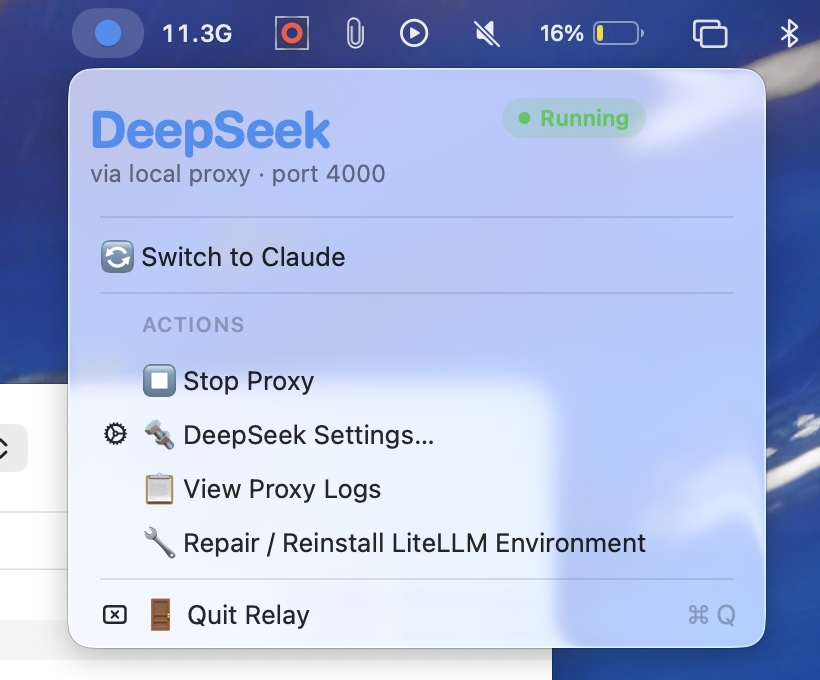
One menu bar icon. Two AI backends. Zero friction.
Relay sets ANTHROPIC_BASE_URL and ANTHROPIC_AUTH_TOKEN in both Claude Code surfaces — the CLI settings file and VS Code's extension config — and runs a local LiteLLM proxy that translates Anthropic's API to DeepSeek's. Toggle off and the env vars are removed; Claude Code goes straight back to your claude.ai subscription.
CLI + VS Code
:4000
API
One-click toggle
Switch between Anthropic and DeepSeek from the menu bar. The icon turns blue or coral so the current routing is visible without opening the menu.
Quit to revert
Exit the app and all routing is removed — no stale env vars pointing at a dead proxy on next launch. Your claude.ai login stays saved.
Keychain-backed
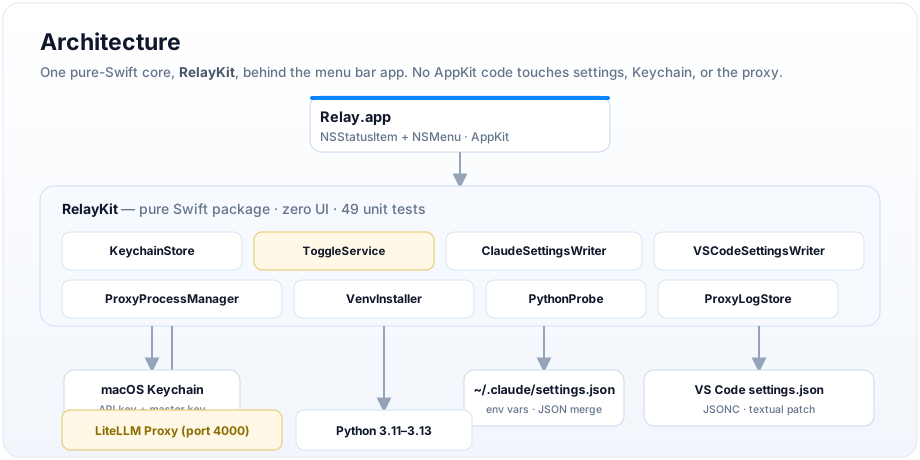
Your DeepSeek API key and the LiteLLM master key both live in your macOS login Keychain — never on disk.
A local LiteLLM proxy that Claude Code already knows how to talk to.
Claude Code reads ANTHROPIC_BASE_URL at startup. Point it at the proxy and every request routes through LiteLLM's wildcard model router — translating Anthropic's /v1/messages to DeepSeek's OpenAI-compatible API on the fly. That's the whole mechanism.
One command, from a checkout.
The build script compiles, signs, and installs Relay.app to /Applications.
$ git clone https://github.com/gokulmc/relay.git && cd relay && ./setup-signing.sh && ./build.sh